
Blog
Programming challenges, experiments, and build notes behind short videos.
Programming challenges, experiments, and build notes behind short videos.
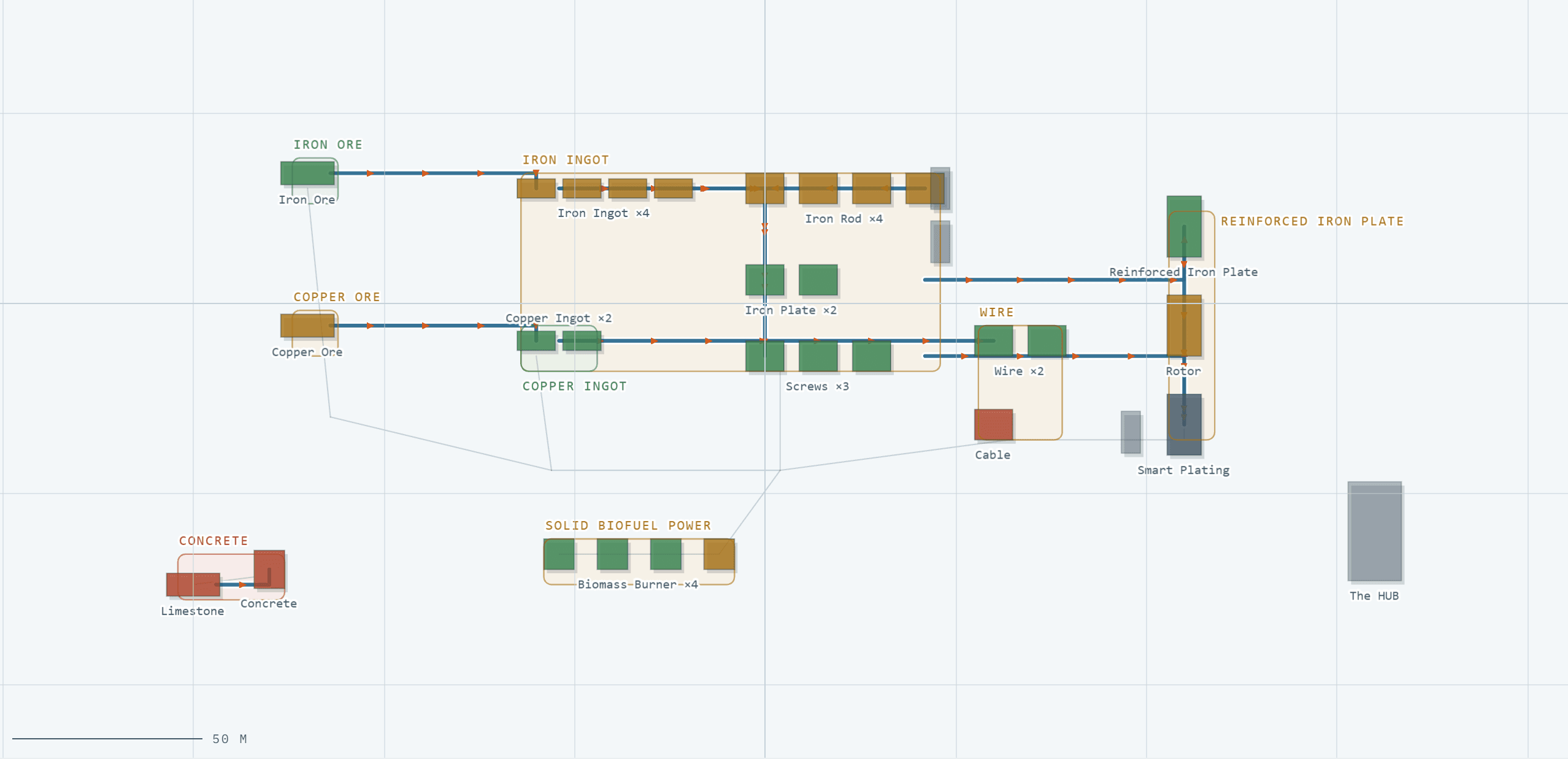
I started playing Satisfactory at the end of August. Five weeks later I had the base every new player ends up with: belts going over belts, a smelter row I no longer remembered building, and a feeling that half of it was idling. The game tells you surprisingly little about why. You walk up to a machine, it says 67%, and you walk away none the wiser.
The tools don't help much with that either. There are good planners for Satisfactory, and they all answer the same question: what do I need to build to make 10 Reinforced Iron Plates a minute? You type in what you want, they give you ratios. None of them look at what you actually built. The factory on my disk and the plan in my head never met.
So I built the meeting point. Factory Board reads your .sav file in the browser and tells you which lines are slow, why, and what to fix first.
The first version did the obvious thing: it read every machine's uptime from the save and coloured the lines. Anything between 60% and 95% got the label starving, because that's what a slow machine usually is.
The biggest line in my base was four Iron Rod constructors averaging 67%. Starving, said the board. So the fix was obvious: more smelters, more ingots.
That would have made it worse. Those four constructors had full input buffers and full output buffers. They weren't waiting for iron. They had nowhere to put the rods. The line was backed up, the exact opposite problem, and building more supply would only have filled the belt faster.
The save knew this all along. Every machine in a Satisfactory save carries its input and output inventories, and together they separate the two cases uptime alone mixes up:
Measured in runs, not items, because a recipe wanting 25 screws and one wanting 2 wire are only comparable in runs. That also names the culprit: a Rotor assembler sitting on 200 Iron Rods and 25 Screws is short of screws, since 25 screws is one run and 200 rods is forty.
And when none of the readings explain a slow line, it says so. "Powered, fed and not backed up, yet still slow" is a better answer than a confident wrong one. That idea ended up shaping everything else.
Drop a save on the page and the top of the Overview answers one question: what to fix first. Up to three problems, grouped by cause, each with what the save shows and what to try:
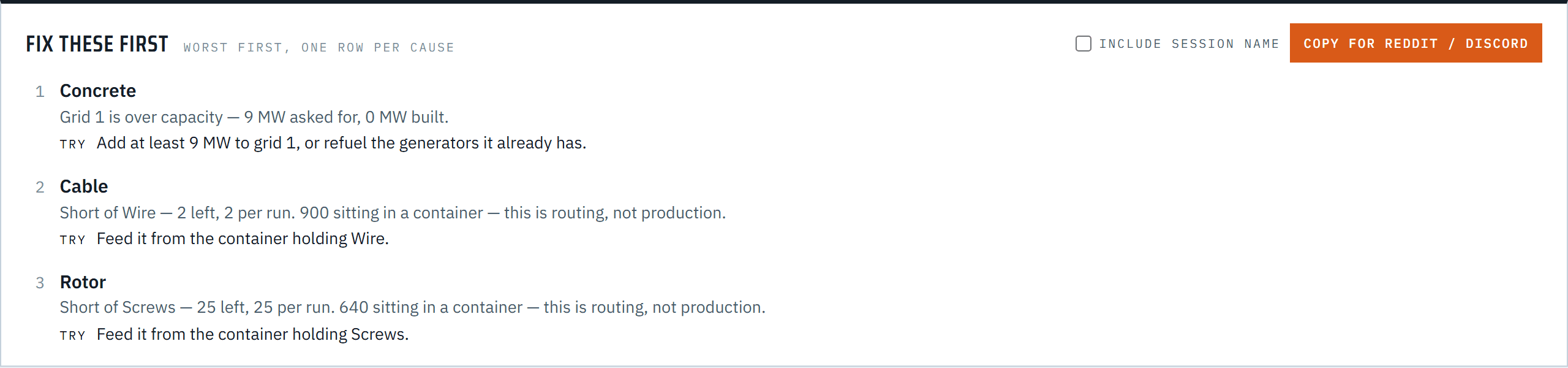
Two of those three are my favourite kind of finding: the line is short of something the base already has hundreds of, in a box. That's not a production problem, it's a routing problem, and "build more wire" is the wrong instruction. On my own save, the board found 2,282 Wire sitting in a container while the Cable line starved next to it.
Grouping by cause matters more than it sounds. One overloaded power grid makes every line on it slow, and a list sorted by uptime shows you the same sentence three times while the second and third real problems fall off the bottom. So lines on one grid are one problem, and lines short of the same part are one problem.
The fix itself is advice, and it only goes as far as the reading does. A full belt gets the next tier of the same kind: a full Conveyor Lift is not fixed by a faster belt, and a pipe's cubic metres are not items. And because a save records which recipes you've unlocked but not which buildings, a tier you haven't built yet is suggested with exactly that caveat, not called locked or available.
There's a Copy for Reddit / Discord button too, which puts the same list on your clipboard as Markdown. That's the whole distribution strategy: if the diagnosis is useful, it ends up in someone's "why is my factory slow" thread.
Most of the work was learning, the hard way, what a save file actually says.
A dead grid looks exactly like starvation. A machine with no power stops, its inputs stay full, its output stays empty, and the buffers describe a supply problem it doesn't have. So power is checked first, and it's read straight from the save, which states per grid what's asked for and what can be supplied. Totalling nominal power draw from the recipe book had understated my real consumption by a third: 125 MW calculated, 188 MW actual, because miners, pumps and the radar tower draw power too.
A belt's load is followed, not guessed. The first attempt compared a line's output to the nearest belt, and it called two of my twelve lines over capacity. Neither was. Now the flow is walked from each machine along the actual connections the save records, through mergers, and it stops at a splitter, because how much goes each way depends on what's at the far ends.
Raw resources end the recipe tree. The game ships Converter recipes that make iron ore out of SAM, and they aren't flagged as alternates. Without a hard rule that ore comes from the ground, the solver answered a simple Tier 2 request with 22 Converters and 733 SAM a minute.
A transcription is a guess until the save checks it. Space Elevator quotas aren't in the game's data files, so they're copied from the wiki. For a week the board showed Phase 2 as 500 / 500 / 100 when it's actually 1,000 / 1,000 / 100. Now a quota the save has already delivered past gets withdrawn rather than shown as a target, because that can only mean the number is wrong for that world.
The Base view draws every building from the save at its real size and position, grouped into zones, with belts showing which way items flow. There's one colour channel, and it belongs to health: green is keeping up, amber is slow, red is under 60%. Planner, History across autosaves, and Progression round it out.
A save file is personal, and the tool is only worth trusting if that stays true. So there is no backend. The app is a static export, the save is parsed in a Web Worker in your tab, and nothing is uploaded.
On the hosted copy that's enforced, not just promised: a Content-Security-Policy tells the browser to refuse any network request except the site itself and one anonymous visit counter, which receives page views and event names like "a save was dropped". No file names, no session names, nothing from the save. You can check it in DevTools.
That policy caught a real bug before launch. The map renders with PixiJS, which compiles shader code with new Function, and a policy that forbids eval makes it fail with nothing more than "could not start WebGL". The fix is one import, pixi.js/unsafe-eval, which, despite the name, is the module that makes Pixi work without eval. I only found it because the browser test suite runs against the real container, headers included.
One decision I went back and forth on: the recipe book. The game's recipes live in a Docs.json file inside every install, and the repository deliberately doesn't contain them, because it's Coffee Stain's content. You can drop your own Docs.json on the page. But asking a stranger to find two files, one of them buried in the install folder, is a good way to lose them. So the hosted copy ships a book extracted from the game (the header tells you which game build it's from), the repository still contains none, and your own file still overrides it.
Docs.json extractor, a save reader built on @etothepii/satisfactory-file-parser, and the layout maths for the map.Open factory-board.gapchix.io and drop your newest save on the page. Saves are in %LOCALAPPDATA%\FactoryGame\Saved\SaveGames. There's a demo base if you don't have one handy. The source is on GitHub under MIT.
If it tells you something wrong about your factory, I want to hear about it. That's how every rule above got written.